


December 1, 2025
/
Why Core Web Vitals Matter in 2026?
In 2026, Google’s ranking algorithms have become more user-centric than ever, and Core Web Vitals now stand at the center of this transformation. These metrics—such as loading speed, interactivity, and visual stability—help Google understand how real users experience your website. In simple terms, Core Web Vitals allow Google to measure how fast, responsive, and stable your pages are, which directly influences your SEO performance.
As competition grows and user expectations rise, page experience is no longer optional. A slow, unstable, or poorly optimized website causes higher bounce rates, lower conversions, and weaker organic visibility—especially on mobile. This is why brands that invest in Core Web Vitals optimization consistently outperform competitors in search rankings.
To help businesses stay ahead, AQ, a leading digital marketing and SEO agency, provides advanced Core Web Vitals optimization, full website performance audits, and technical SEO solutions. With AQ’s expertise, brands can achieve top performance scores, improve user experience, and strengthen their overall search visibility.
What Are Google’s Core Web Vitals?
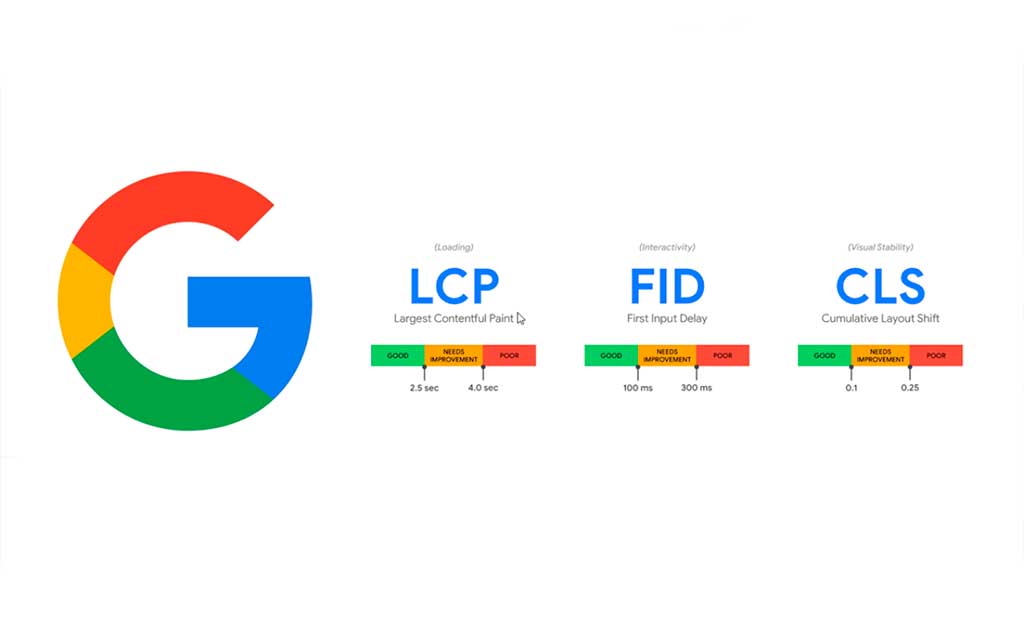
Google’s Core Web Vitals are a set of performance metrics designed to measure how users actually experience your website in real-world conditions. These signals help Google evaluate whether your site loads quickly, responds instantly, and displays elements without unexpected movement. Each metric focuses on a specific part of user experience and plays a major role in your search rankings. Below is a breakdown of the three main Core Web Vitals and how they affect SEO:Largest Contentful Paint (LCP) — Loading Performance
Largest Contentful Paint (LCP) measures how long it takes for the main, meaningful content of a page to appear — usually a hero image, large banner, or headline. It is one of Google’s most important performance metrics because it reflects the moment when users feel the page has started to load properly. If your LCP is slow, visitors perceive your website as unresponsive, even if the rest of the page is still loading in the background. This directly affects bounce rate, time on site, and the overall user experience, making LCP a powerful ranking factor in Google’s algorithm. Achieving a strong LCP score (2.5 seconds or faster) requires optimizing several areas, including server response time, caching, image sizes, and critical resource loading. Websites with large hero images, render-blocking scripts, or weak hosting environments often struggle with LCP delays. By optimizing images to WebP, using CDNs, preloading key assets, and removing heavy scripts, websites can significantly improve LCP performance. Google prioritizes fast-loading pages, and improving LCP is one of the most effective ways to build trust and enhance SEO visibility. While hashtags bring the users, your Core Web Vitals keep them on the site.Interaction to Next Paint (INP) — Interactivity Responsiveness
Interaction to Next Paint (INP) measures how quickly a page responds to user actions like clicks, taps, or keyboard inputs. Instead of focusing only on the first interaction like FID did, INP evaluates responsiveness throughout the entire session, offering a much clearer picture of the user experience. If your site feels sluggish or delayed when interacting with buttons, menus, or forms, it results in a higher INP score — signaling to Google that your interface may be frustrating or inefficient. A “good” INP score should be below 200 milliseconds. Delays usually occur when the main thread is overloaded with heavy JavaScript, unnecessary animations, or too many third-party scripts. Optimizing JS handling, deferring non-critical scripts, reducing code execution time, and cleaning up unused libraries are essential steps for improving INP. Modern users expect instant responsiveness, and Google rewards websites that deliver a smooth, fast, and fluid interaction experience. Improving INP is one of the strongest signals of professional site performance and high-quality UX.Cumulative Layout Shift (CLS) — Visual Stability
Cumulative Layout Shift (CLS) measures the visual stability of your webpage — specifically, how much elements unexpectedly move while the page is loading. These layout jumps are not only annoying but can cause users to click the wrong button, lose their reading position, or abandon the page. CLS is a major part of Google’s Page Experience criteria because it affects usability and accessibility across all devices, especially mobile. A CLS score of 0.1 or lower is considered good. High CLS issues usually occur due to images without defined dimensions, ads loading above content, delayed font rendering, or dynamic elements shifting the page layout. To improve CLS, developers should set explicit width/height attributes, reserve space for ads, and preload fonts to prevent layout jumps. A stable layout enhances user trust, improves engagement, and leads to higher conversion rates — which is why Google treats CLS as a critical ranking metric in technical SEO. Build a winning content strategy by planning hashtags months in advance.Why Core Web Vitals Are Critical for SEO?
Core Web Vitals have become a major ranking signal because Google now prioritizes websites that deliver real, measurable user satisfaction. When your site loads fast, responds instantly, and maintains visual stability, Google views it as trustworthy and user-friendly — two essential components of E-E-A-T (Experience, Expertise, Authoritativeness, Trustworthiness). Improved Core Web Vitals directly contribute to higher rankings, stronger visibility, and better crawl efficiency. These performance metrics also act as trust signals for users; a smooth browsing experience makes your brand feel more professional, reliable, and credible. Better Core Web Vitals lead to longer on-page engagement, lower bounce rates, and significantly higher conversions, especially on mobile devices where performance issues are more noticeable. Google’s UX-first algorithm updates reward websites that focus on user experience, meaning Core Web Vitals are not just technical requirements — they are business growth drivers. Brands that optimize for LCP, INP, and CLS see real results: more organic traffic, stronger customer satisfaction, and increased revenue. From an expert SEO perspective, Core Web Vitals are no longer optional; they are a foundational part of sustainable ranking success and long-term digital performance.How to Test Core Web Vitals (Tools & Real Data)
To optimize Core Web Vitals effectively, you must start by testing your website using reliable tools that measure real performance, user experience, and technical issues. Each tool offers unique insights: some show field data from real users, while others provide lab data for controlled debugging. Below is a complete breakdown of the most important Core Web Vitals testing tools — what they do, why they matter, and the exact metrics they deliver.PageSpeed Insights (Google’s Default Tool)
PageSpeed Insights (PSI) is Google’s primary tool for analyzing how your website performs according to real-world user data. Because PSI integrates directly with the Chrome User Experience (CrUX) dataset, it shows the same performance signals Google uses in ranking. It’s the most accurate platform for checking whether your website passes or fails Core Web Vitals. Organic reach via tags is great, but Twitter campaigns scale your business faster.What Metrics It Gives
- Largest Contentful Paint (LCP)
- Interaction to Next Paint (INP)
- Cumulative Layout Shift (CLS)
- Performance score (mobile & desktop)
- Field data vs lab data comparison
- Opportunities + Diagnostics
- Reduce JS execution
- Remove unused CSS
- Optimize images
- Minimize main-thread work
- Passed/Failed Core Web Vitals status
Lighthouse (Deep Performance & Technical Audit Engine)
Lighthouse is an open-source auditing framework built into Chrome DevTools. It provides a detailed technical breakdown ideal for developers fixing complex speed issues. Unlike PSI, Lighthouse doesn’t rely on real user data — it simulates performance, making it perfect for debugging during development.What Metrics It Gives
- LCP, INP, CLS (Lab data)
- Speed Index
- Total Blocking Time (TBT)
- Time to Interactive (TTI)
- JavaScript execution time
- Unused CSS/JS audits
- Main-thread work analysis
- Network request breakdown
- Accessibility score
- SEO score
Google Search Console — Core Web Vitals Report
Google Search Console (GSC) provides the most reliable site-wide Core Web Vitals overview. Unlike single-page tools, it groups URLs based on user experience and shows actual performance trends over time. If a URL fails in GSC, Google considers it a ranking issue — making this report essential for long-term monitoring.What Metrics It Gives
- Real user field data only (CrUX)
- LCP, INP, CLS for all indexed pages
- URL group performance status:
- Good
- Needs improvement
- Poor
- Trend analysis (28-day rolling data)
- List of affected pages
- Error explanations (LCP issues / CLS issues / responsiveness issues)
- Mobile vs desktop performance segmentation
WebPageTest (Advanced Performance Testing Tool)
WebPageTest is a highly advanced tool used by developers and performance engineers. It lets you test from different countries, devices, browsers, and connection speeds—making it ideal for global brands or businesses with heavy traffic. Its deep diagnostics and waterfall visualizations make it one of the most reliable tools for understanding technical performance barriers.What Metrics It Gives
- LCP, INP, CLS (Lab data)
- Time to First Byte (TTFB)
- Connection negotiation times
- Full waterfall chart
- Render start time
- Speed Index
- Video playback of load sequence
- Main-thread CPU usage
- Resource-level performance breakdown
GTmetrix (Lighthouse + Waterfall Performance Analysis)
GTmetrix is a popular tool that combines Lighthouse scores with its own powerful waterfall visualization. It’s ideal for identifying slow-loading resources, heavy scripts, or server delays. Many developers prefer GTmetrix due to its clean reporting system and straightforward optimization suggestions.What Metrics It Gives
- LCP, INP, CLS
- Speed Index
- Total Blocking Time (TBT)
- Fully loaded time
- Page size (KB/MB)
- Number of requests
- Waterfall breakdown (JS, CSS, fonts, images)
- Server response delays
- Performance grade + Structure grade
Core Web Vitals Test: How to Read & Understand the Results
Understanding Core Web Vitals test results is essential for making the right optimization decisions. Tools like PageSpeed Insights, Lighthouse, and Search Console give you tons of data — but the real value comes from interpreting these numbers correctly. Below is a complete breakdown of how to read each section of PageSpeed Insights and how to distinguish between page-level issues and site-wide performance problems.1. Field Data vs Lab Data
Field Data (Real Users)
Field Data shows you how real visitors experience your website. This data comes from the Chrome User Experience Report (CrUX), making it the most important section for SEO and ranking signals. How to read it:- Shows real-world Core Web Vitals (LCP, INP, CLS)
- Indicates whether your URL passes or fails Google’s required thresholds
- Represents performance over the last 28 days
- Shows both mobile and desktop experience
Lab Data (Simulated Test)
Lab Data is generated in a controlled environment, showing how your page performs without external variables like device quality or network speed. How to read it:- Shows metrics like LCP, CLS, Speed Index, TBT, Time to Interactive
- Useful for debugging, not ranking
- Helps identify performance bottlenecks like render-blocking JavaScript or slow images
Opportunities Section
The Opportunities section provides specific recommendations that can directly improve your Core Web Vitals scores. How to read it:- Each item shows a time saving estimate (e.g., “Save 1.2s”)
- Focuses mainly on performance optimizations such as:
- Image compression
- Preloading key resources
- Reducing unused JavaScript
- Eliminating render-blocking CSS/JS
- Reducing server delays (TTFB)
Diagnostics Section
Diagnostics provides deeper insights into what is causing performance issues, even if the metric isn’t failing yet. How to read it:- Highlights issues like:
- Long main-thread tasks
- Excessive DOM size
- Large JavaScript bundles
- Inefficient animations
- Layout stability warnings
- Fonts causing CLS
Passed Audits Section
This section shows what your website is already doing well — which is equally important. How to read it:- Lists optimizations your site has already passed
- Includes:
- Proper caching
- Modern image formats
- Efficient font usage
- No render-blocking resources
- Good SEO structure
How to Spot Page-Level Problems
Page-level issues affect individual URLs and show up when only one page fails Core Web Vitals. What to look for:- A single URL has poor LCP or CLS
- Issues appear only on certain templates (e.g., product pages)
- Affected by:
- Heavy hero images
- Page-specific JavaScript
- Dynamic content loading
- CSS for that page only
How to Identify Site-Wide Performance Issues
Site-wide issues affect multiple URLs at once and appear in Google Search Console as failing URL groups. What to look for:- Many URLs show “Poor” or “Needs Improvement”
- Problems appear across multiple templates
- Common causes include:
- Slow hosting
- No CDN
- Global JavaScript bundle is too large
- Blocking scripts injected site-wide
- Framework issues (e.g., Shopify apps, WordPress plugins)
Common Core Web Vitals Issues (and How to Fix Them)
Organize by problem + solution:LCP Fixes
- Optimize hero images
- Reduce server response time
- Use next-gen image formats (WebP, AVIF)
- Preload critical elements
INP Fixes
- Reduce heavy JavaScript
- Defer non-critical scripts
- Improve main-thread performance
CLS Fixes
- Set width/height attributes
- Avoid intrusive ads/popups
- Preload fonts to prevent layout shift
How AQ Helps You Optimize Core Web Vitals (Service Pitch + E-E-A-T)
Paragraph (as requested): Optimizing Core Web Vitals requires deep technical expertise, real performance engineering, and continuous monitoring — and that’s exactly where AQ delivers exceptional value. As a leading digital marketing and SEO agency, AQ combines technical SEO, performance diagnostics, and UX engineering to help brands achieve fast, stable, high-performing websites that fully pass Google’s Core Web Vitals standards. AQ’s process includes: specialized Core Web Vitals scanning, full technical audits, detailed PageSpeed Insights + Lighthouse analysis, server-level tuning such as hosting, caching, and CDN optimization, complete image compression systems, JavaScript reduction + code cleanup, layout stability enhancements, and ongoing monthly performance monitoring. With AQ, clients get a fully integrated SEO + speed optimization strategy that boosts rankings, conversions, and long-term digital growth.⭐ AQ Provides:
- Core Web Vitals scanning & full technical audit
- PageSpeed Insights + Lighthouse detailed analysis
- Hosting, caching & CDN optimization
- Full image optimization strategy
- JavaScript reduction, minification & code cleanup
- UX & layout stability improvements
- Monthly performance & SEO monitoring
- Combined Technical SEO + Performance Optimization strategy
AQs About Core Web Vitals
1. What are Core Web Vitals?
Core Web Vitals are Google’s user-experience performance metrics measuring loading speed, interactivity, and visual stability, directly influencing SEO rankings.2. Why are Core Web Vitals important for SEO?
Google uses these metrics as official ranking signals. Better scores = faster websites = higher rankings + better conversions.3. What is a good Core Web Vitals score?
- LCP: under 2.5 seconds
- INP: under 200 ms
- CLS: under 0.1
4. How do I test my Core Web Vitals?
You can use tools like PageSpeed Insights, Lighthouse, Search Console, WebPageTest, GTmetrix, or AQ’s proprietary performance scans.5. What affects LCP (Largest Contentful Paint)?
Server speed, render-blocking scripts, large images, heavy themes, and poor caching systems.6. How can I fix INP issues?
Reduce JavaScript, remove unnecessary event listeners, optimize third-party scripts, and ensure faster browser response time.7. Why does CLS happen?
Shifting layouts caused by unoptimized images, ads loading dynamically, or animations pushing the layout.8. How long does it take to improve Core Web Vitals?
AQ typically sees strong improvements within 1–4 weeks, depending on site complexity.9. Can poor hosting affect Core Web Vitals?
Yes. Slow servers, shared hosting, and no CDN can drastically hurt performance.10. Does passing Core Web Vitals guarantee higher rankings?
Not alone—but it significantly boosts SEO potential and improves competitiveness against similar sites.11. Does AQ handle full Core Web Vitals optimization?
Yes. AQ delivers audits, fixes, testing, monitoring, and long-term SEO improvements.12. Are Core Web Vitals the same for mobile and desktop?
They’re measured differently—Google prioritizes mobile scores as the primary ranking factor.
Recent Posts

abdelrahman.qazaer@gmail.com/0 Comments
Long-Form Video Content: The Ultimate Guide for Marketers

abdelrahman.qazaer@gmail.com/0 Comments
Visual Design in Ads

abdelrahman.qazaer@gmail.com/0 Comments