In the fast-paced world of digital marketing, simply having a website is no longer enough. To ensure your content reaches the right audience and ranks high on search engines, you need a clear roadmap—both for your visitors and for search engines. This is where a sitemap comes into play.
A sitemap acts as the blueprint of your website, guiding search engines to every important page and helping them understand your site’s structure. Whether you run a small blog or manage a large e-commerce platform, a well-constructed sitemap can significantly improve your SEO performance, accelerate content discovery, and enhance user experience.
In this comprehensive guide, we’ll explore everything about sitemaps: the different types of sitemap, their benefits, how to create one using a sitemap generator or creator, and how to optimize it to maximize your website’s visibility. By the end of this article, you’ll have the knowledge and tools to make your website fully search-engine friendly.
What is a Sitemap?
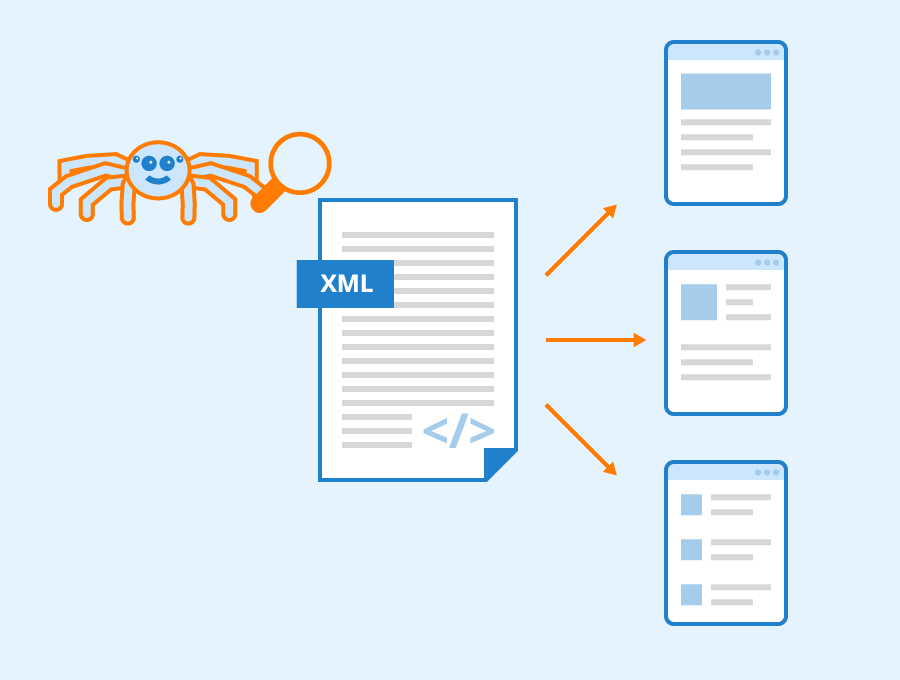
A sitemap is essentially a roadmap of your website. It is a file that lists all the pages, posts, and other content elements of your website, making it easier for search engines like Google, Bing, and Yahoo to discover and index your content. Sitemaps can come in various formats, the most common being XML and HTML. While XML sitemaps are designed specifically for search engines, HTML sitemaps help human visitors navigate your site efficiently. The importance of a sitemap in SEO cannot be overstated. A well-structured sitemap ensures that search engines can crawl your website effectively, particularly for large, complex, or dynamic websites. It also improves the chances of new content being indexed quickly, which is crucial for maintaining visibility in search results.Types of Sitemap
Understanding the types of sitemap is essential for implementing an effective SEO strategy. The main types include:1. XML Sitemap
An XML sitemap is a file that provides search engines with information about the pages on your website. It includes metadata such as the last modified date, the importance of pages, and the frequency of updates. Using a sitemap generator or sitemap creator can simplify this process, making it easier to maintain an up-to-date sitemap.2. HTML Sitemap
Unlike XML sitemaps, HTML sitemaps are created for human visitors. They typically appear as a structured list or table of contents on your website, helping users navigate complex sites more easily. While HTML sitemaps indirectly benefit SEO by improving user experience, they are primarily a usability feature.3. Video Sitemap
If your website contains video content, a video sitemap allows search engines to index your videos properly. This includes details like video duration, category, and thumbnail URL, making your video content more likely to appear in search results and rich snippets.4. Image Sitemap
An image sitemap is useful for websites with heavy visual content. It helps search engines discover and index images, which is crucial for driving traffic from Google Images and other visual search platforms.5. News Sitemap
For websites publishing news articles frequently, a news sitemap ensures that search engines can quickly index time-sensitive content. This is particularly beneficial for improving visibility in Google News and other news aggregators.The Benefits of a Sitemap
Implementing a sitemap offers numerous advantages for both search engines and website owners. Some of the most significant benefits of a sitemap include:1. Improved Indexing
A sitemap helps search engines index your pages more efficiently. Even if some pages are not well linked internally, search engines can still discover them through your sitemap.2. Faster Content Discovery
When you publish new content, a sitemap ensures that search engines can find and index it quickly. This is crucial for blogs, e-commerce sites, and news portals where timely indexing is essential.3. Enhanced Crawl Efficiency
Sitemaps help search engines prioritize which pages to crawl, especially on large websites. By providing metadata such as last updated dates and priority levels, search engines can focus on the most important pages first.4. Supports Rich Media Indexing
For websites with videos or images, sitemaps provide additional information that improves the likelihood of these media types appearing in search results.5. Provides Insights through Google Search Console
Submitting your sitemap to Google Search Console allows you to monitor crawl activity, detect errors, and optimize your SEO strategy based on real-time data.Sitemap vs Robots.txt: What’s the Difference?
Many website owners confuse sitemaps with robots.txt files, but they serve different purposes:- Sitemap: Guides search engines to important pages, improving indexing. It is proactive and helps search engines discover content.
- Robots.txt: Instructs search engines which pages or directories not to crawl. It is restrictive and prevents indexing of certain parts of the website.
How to Create a Sitemap
Creating a sitemap is an essential step for improving your website’s SEO. It ensures that search engines can easily discover and index all your important pages, boosting your chances of ranking higher in search results. Depending on your website size and technical expertise, there are several ways to create a sitemap:1. Using a Sitemap Generator
One of the easiest ways to create a sitemap is by using a sitemap generator. These tools automatically scan your website and produce a fully structured sitemap.xml file that can be submitted to search engines. Popular sitemap generators include:- Screaming Frog SEO Spider: Ideal for large websites, it crawls your site and generates XML sitemaps.
- Yoast SEO (WordPress): Automatically creates and updates your sitemap.xml whenever you add new content.
- XML-Sitemaps.com: A free online tool suitable for small to medium websites.
2. Using a Sitemap Creator Plugin or Tool
For users who prefer a more integrated approach, a sitemap creator plugin can simplify the process. These tools are often built into content management systems (CMS) like WordPress, Shopify, or Wix.- WordPress Plugins: Yoast SEO, Rank Math, and All in One SEO automatically generate sitemaps and update them as you publish new posts or pages.
- Shopify: Automatically creates an XML sitemap for your store that updates whenever you add new products.
- Wix & Squarespace: Built-in sitemap creation ensures your site is always search-engine ready.
3. Creating a Sitemap Manually
For developers or websites with specific requirements, you can create a sitemap manually in XML format. Here’s how:- List all URLs: Include all important pages you want search engines to index.
- Add metadata: Use XML tags such as <lastmod> (last modified date), <changefreq> (how often the page changes), and <priority> (page importance).
- Save the file as sitemap.xml: Place it in your website’s root directory (e.g., https://www.yoursite.com/sitemap.xml).
- Validate the sitemap: Use online XML validators or Google Search Console to ensure there are no errors.
4. Best Practices for Creating a Sitemap
To maximize the benefits of your sitemap in SEO:- Only include important pages—avoid duplicate or low-value content.
- Keep your sitemap up-to-date, especially for websites with frequent updates.
- Use multiple sitemaps or a sitemap index for large websites.
- Ensure your sitemap is accessible to search engines and listed in your robots.txt file.
- Submit your sitemap to search engines like Google Search Console and Bing Webmaster Tools.
Submitting Your Sitemap to Search Engines
After creating a sitemap, submitting it to search engines ensures proper indexing and monitoring:1. Google Search Console
- Login to Google Search Console.
- Navigate to “Sitemaps” under the Index section.
- Enter the URL of your sitemap (e.g., https://www.yoursite.com/sitemap.xml).
- Click “Submit” and monitor indexing status.
2. Bing Webmaster Tools
- Login to Bing Webmaster Tools.
- Add your website and verify ownership.
- Navigate to “Sitemaps” and submit your XML sitemap URL.
3. Monitoring Sitemap Performance
Regularly check for errors, such as broken links, blocked pages, or indexing issues. Correcting these ensures your website remains SEO-friendly and search engines can access all important pages.Advanced Sitemap Strategies
For websites with complex structures or dynamic content, advanced strategies can improve SEO effectiveness:1. Dynamic Sitemaps
Websites with frequent updates or large catalogs (like e-commerce stores) benefit from dynamic sitemaps that automatically update as new pages are added.2. Video and Image Sitemaps
For media-heavy sites, separate video and image sitemaps enhance visibility in rich search results. Include metadata like video duration, image captions, and content category for better indexing.3. Sitemap Segmentation
Large websites can divide their sitemaps into multiple files, grouped by category or content type. This approach improves crawl efficiency and prevents exceeding size limits imposed by search engines.4. Sitemap Index File
A sitemap index file is a master sitemap that links to multiple sitemaps. This is especially useful for large websites with thousands of pages, ensuring all content is discoverable.Common Sitemap Mistakes to Avoid
Even experienced webmasters can make mistakes when implementing sitemaps. Common errors include:- Including Noindex Pages: Ensure that pages blocked from indexing are not included in your sitemap.
- Broken URLs: Avoid including URLs that return 404 errors.
- Large Sitemaps Without Segmentation: Very large sitemaps can cause crawling issues.
- Failing to Update Sitemap: Regularly update your sitemap to include new content and remove outdated pages.
- Ignoring Sitemap Submission: Creating a sitemap is not enough—submitting it to search engines is critical.
The importance of sitemap in search engine optimization
A sitemap plays a crucial role in search engine optimization by serving as a roadmap for search engines to navigate your website. It ensures that all your important pages, including new or deeply nested ones, are easily discoverable and indexed. By providing metadata such as last updated dates and page priority, a sitemap helps search engines understand which pages are most important, improving crawl efficiency and ensuring that your content appears in search results more quickly. Beyond technical indexing, a sitemap indirectly enhances SEO by improving user experience. For example, an HTML sitemap helps visitors navigate complex websites more easily, while XML sitemaps make your content more visible to search engines. Overall, a well-structured sitemap supports higher search rankings, faster content discovery, and better visibility, making it an essential component of any effective SEO strategy.Tools and Resources for Creating Sitemaps
To simplify the process of creating and managing sitemaps, consider using the following tools:- Yoast SEO: WordPress plugin for automated sitemap generation.
- Screaming Frog SEO Spider: Crawls websites and generates XML sitemaps.
- XML-Sitemaps.com: Online generator for small to medium websites.
- Google Search Console: For submission, monitoring, and error detection.
Conclusion
In conclusion, a well-structured sitemap is more than just a technical requirement—it is a vital tool that strengthens your website’s SEO, improves indexing, and ensures that both search engines and visitors can navigate your content efficiently. From XML and HTML sitemaps to advanced strategies for large or media-rich sites, implementing and maintaining a sitemap is a fundamental step toward long-term online success.For businesses and website owners looking to maximize their SEO performance and ensure their site follows the best practices, Above-Quality provides expert digital solutions, including sitemap creation, SEO optimization, and comprehensive website management. With their guidance, you can harness the full power of sitemaps to enhance visibility, drive traffic, and achieve sustainable growth in search engine rankings.
FAQs
Q1: What is a Sitemap?
A sitemap is a file that lists all pages and content on your website, helping search engines crawl and index your site more efficiently.Q2: How do I create a Sitemap?
You can create a sitemap manually, use a sitemap generator, or leverage built-in features in CMS platforms like WordPress, Shopify, or Wix.Q3: Sitemap vs Robots.txt – What’s the difference?
A sitemap guides search engines to important pages, while robots.txt tells search engines which pages not to crawl. Both are essential for SEO, but serve opposite functions.Q4: What are the benefits of a Sitemap in SEO?
Sitemaps improve indexing, speed up content discovery, enhance crawl efficiency, and support rich media indexing, boosting overall SEO performance.Q5: How do I submit a Sitemap to Google?
Use Google Search Console, navigate to “Sitemaps,” enter your sitemap URL (e.g., sitemap.xml), and click “Submit.”