


Maximizing E-Commerce Success with Google Shopping Ads
November 30, 2025
/
Maximizing E-Commerce Success with Google Shopping Ads
Are your products getting lost among countless search results, leaving potential sales untapped? Google Shopping Ads and Product Listing Ads (PLAs) are designed to solve exactly this problem. By showcasing your products directly to shoppers actively searching for them, these ads connect businesses with high-intent customers who are ready to make a purchase.
For e-commerce brands, this means higher visibility, more qualified traffic, and a stronger return on ad spend. Google Merchant Center serves as the backbone of these campaigns, enabling businesses to upload product data, manage feeds, and optimize listings for maximum impact.
At AQ, we specialize in helping brands unlock the full potential of Google Shopping Ads. From setting up and optimizing Merchant Center accounts to crafting high-performing PLA campaigns, AQ ensures every ad drives measurable results and boosts your digital marketing ROI.
What are Google Shopping Ads?
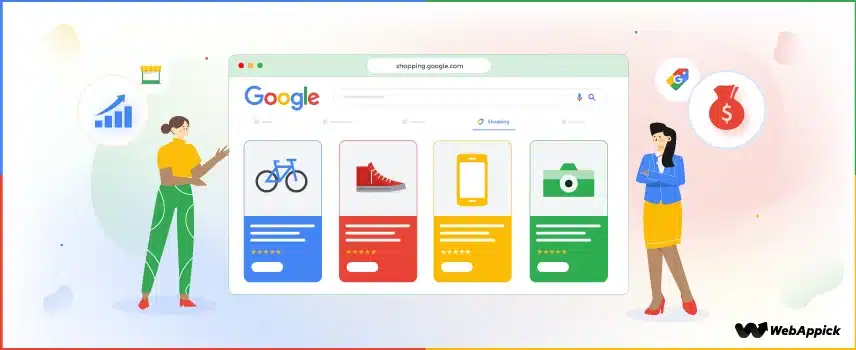
Google Shopping Ads are a type of online advertisement that displays your products directly in search results with images, prices, and store information, making it easy for shoppers to browse and buy. Unlike traditional search ads that rely on text alone, Shopping Ads provide a visual and detailed product preview, helping customers make quicker purchase decisions. By leveraging Google Merchant Center, businesses can manage product feeds, optimize listings, and ensure their ads appear to highly relevant, high-intent shoppers, driving both visibility and conversions.Types of Shopping Ads:
Standard Shopping Ads
Standard Shopping Ads allow advertisers to showcase individual products in Google search results with images, titles, prices, and store names. You control bids and targeting for each product or product group, making it ideal for businesses that want precise control over their campaigns and want to optimize performance manually.Smart Shopping Campaigns
Smart Shopping Campaigns combine standard Shopping Ads with automated bidding and ad placement across Google Search, Display, YouTube, and Gmail. Google uses machine learning to optimize for conversions or conversion value, making it a powerful option for businesses that want to maximize ROI with less hands-on management.Introduction to Google Merchant Center
Want your products to appear in front of ready-to-buy customers across Google? That’s exactly what Google Merchant Center can do for your business. Google Merchant Center is the platform where e-commerce businesses upload and manage their product information, such as titles, images, prices, and descriptions. It serves as the foundation for Shopping Ads, ensuring that your products are accurately represented and discoverable by potential buyers. By keeping your product data organized and optimized, Merchant Center helps you reach the right audience at the right time. Merchant Center works hand-in-hand with Google Ads, allowing you to create Shopping campaigns that pull directly from your product feed. This integration ensures that your ads display accurate product information, pricing, and availability, improving click-through rates and conversions. Whether you run standard or Smart Shopping campaigns, a well-maintained Merchant Center account is essential for maximizing ad performance. At AQ, we specialize in managing Merchant Center accounts for e-commerce brands. From creating and verifying accounts to optimizing product feeds and ensuring compliance with Google’s requirements, AQ helps businesses achieve higher visibility, better ad performance, and measurable ROI. Our team ensures that every product listing is fully optimized for search relevance and conversion potential.What Are PLAs & How They Appear?
Product Listing Ads (PLAs) are visually rich ads that display your product image, title, price, and store name directly in Google search results. Unlike standard text ads, PLAs give shoppers a preview of the actual product, making it easier for them to compare and make purchasing decisions. They appear prominently in search results and on Google Shopping, increasing the chances of attracting qualified buyers.Importance of High-Quality Product Data:
The success of PLAs depends heavily on the quality of your product data. Accurate and compelling titles, clear and high-resolution images, detailed descriptions, and competitive pricing are crucial for capturing attention and driving clicks. Well-optimized listings not only improve visibility but also help your products appear in the most relevant searches, boosting the likelihood of conversion. At AQ, we help e-commerce brands optimize their Product Listing Ads to maximize clicks and sales. From refining product titles and descriptions to improving images and ensuring accurate pricing, AQ ensures every listing is designed to attract high-intent shoppers. By continuously monitoring and adjusting campaigns, we help businesses achieve higher CTR, better ROI, and increased revenue.How to Set Up a Google Shopping Campaign?
Setting up a Google Shopping campaign is the fastest way to showcase your products to shoppers who are ready to buy. By linking your Google Merchant Center account with Google Ads, uploading a well-optimized product feed, and structuring your campaigns strategically, you can increase visibility, drive clicks, and boost sales for your e-commerce business. Step 1 – Create a Google Merchant Center Account- Go to Google Merchant Center and sign in with your Google account.
- Enter your business information, including store name, website, and target country.
- Verify and claim your website to prove ownership.
- Prepare a product feed file (Google supports formats like CSV, XML, or Google Sheets).
- Include all essential product details: title, description, price, availability, image link, GTIN/SKU, and product category.
- Upload the feed to Merchant Center and check for errors in the diagnostics tab.
- In Merchant Center, go to Settings > Linked Accounts and link your Google Ads account.
- This allows your product data to be used in Shopping campaigns.
- In Google Ads, click Campaigns > New Campaign > Sales or Leads > Shopping.
- Select your linked Merchant Center account and target country.
- Choose campaign subtype: Standard Shopping or Smart Shopping.
- Organize your products into groups (by category, brand, or custom labels).
- Assign bids at the product group level to control spend on high-priority items.
- Choose a bidding strategy: Manual CPC for control or Maximize Conversion Value for automated optimization.
- Set a daily budget that aligns with your advertising goals.
- Review all settings and launch your campaign.
- Monitor performance regularly using Google Ads metrics like CTR, conversion rate, ROAS, and optimize product titles, images, and bids as needed.
Common Mistakes to Avoid
- Poor product data quality.
- Ignoring feed optimization.
- Wrong bidding strategy.
- Not tracking conversions.
How AQ Can Help Your Business
At AQ, we specialize in turning Google Shopping Ads into a powerful sales engine for e-commerce brands. Our team manages every aspect of your campaigns—from creating and verifying Merchant Center accounts, optimizing product feeds, to designing high-performing Product Listing Ads (PLAs). With advanced monitoring, bid adjustments, and data-driven strategies, AQ ensures your campaigns reach the right audience, maximize click-through rates, and deliver measurable ROI. Whether you’re a small business or a large e-commerce store, AQ’s expertise helps your brand stand out in a competitive digital marketplace.Conclusion
Google Shopping Ads and Product Listing Ads offer e-commerce businesses a unique opportunity to reach high-intent shoppers at the exact moment they are ready to buy. By leveraging Google Merchant Center, optimizing product feeds, and running well-structured campaigns, brands can increase visibility, drive conversions, and boost revenue. Partnering with AQ ensures that your Shopping Ads are fully optimized, campaigns are strategically managed, and your digital marketing investment delivers maximum results.FAQs
Q1: What are Google Shopping Ads? A: Google Shopping Ads are visually rich product ads that appear in search results, showing images, prices, and store details to attract high-intent shoppers. Q2: How do I set up a Google Shopping campaign? A: Set up a Google Merchant Center account, upload and optimize your product feed, link it to Google Ads, create a campaign, set bids and budget, and monitor performance regularly. Q3: What are Product Listing Ads (PLAs)? A: PLAs are specific ads that display product details directly in search results, helping shoppers compare options visually and make faster purchase decisions. Q4: How can AQ help improve my Shopping Ads? A: AQ manages your Merchant Center, optimizes product feeds, structures campaigns strategically, monitors performance, and adjusts bids to maximize ROI and sales. Q5: Do small businesses benefit from Shopping Ads? A: Yes! Even small e-commerce stores can increase visibility and drive sales by targeting high-intent shoppers with well-optimized Shopping Ads.
Recent Posts
abdelrahman.qazaer@gmail.com/0 Comments
Keyword Stuffing: The Ultimate Guide for Safe and Effective SEO in UAE and Jordan

abdelrahman.qazaer@gmail.com/0 Comments
Short-Form Social Posts: Comprehensive Guide for UAE & Jordan Businesses

abdelrahman.qazaer@gmail.com/0 Comments