


December 4, 2025
/
Internal Linking strategy: Boost Your Rankings and User Experience
Internal linking for SEO is one of the most overlooked yet powerful strategies to improve search rankings and user engagement. By strategically connecting pages within your website, you not only help search engines discover and index your content more effectively but also guide your visitors through a seamless, user-friendly journey.
Despite its importance, many websites make common mistakes with internal linking, such as overstuffing anchor text with keywords, linking only to top-level pages, or failing to regularly audit for broken links. These errors can dilute your site’s authority and hinder both user experience and SEO performance.
A strong internal linking strategy ensures that every page contributes to your overall SEO goals, distributes link equity efficiently, and keeps visitors engaged longer—ultimately supporting your site’s growth and visibility online.
What is Internal Linking?
Internal linking refers to the practice of connecting one page of your website to another page within the same domain. These links help create a network of pages that guide users and search engines through your website’s content. Unlike external links, which point to pages on other websites, internal links remain within your own site, making them a key component of your site’s structure and navigation. While external links build your site’s authority through references from other sources, internal links distribute your own site’s authority across pages, enhancing the SEO value of each linked page. Internal linking matters for SEO for several important reasons:- Link Equity Distribution: Internal links pass authority from high-ranking pages to other pages, helping boost their search visibility.
- Crawlability: Search engine bots use internal links to discover and index new or important pages on your site efficiently.
- User Experience (UX): Thoughtfully placed internal links guide visitors to relevant content, keeping them engaged longer and reducing bounce rates.
How Internal Linking Improves SEO?
A well-planned internal linking strategy does more than just connect pages—it strengthens your site’s SEO, enhances user experience, and ensures that both search engines and visitors can navigate your content effortlessly. By strategically linking your pages, you can maximize visibility, distribute authority, and reinforce the relevance of your content across your website.How to Build an Internal Linking Strategy
Building an effective internal linking strategy is key to improving SEO, user experience, and site authority. Each step below dives deeper into actionable methods, tools, and examples to help you implement a strong linking structure.Conduct a Full Site Audit
Internal links act as pathways for search engine bots, helping them discover and index every important page on your website. Pages that are linked from other high-authority pages are more likely to be crawled frequently, ensuring that your newest content is quickly recognized by search engines and has a better chance of ranking. Before creating new internal links, you must understand your current website structure. A full site audit helps identify:- High-performing pages: Pages with strong traffic or backlinks that can pass link equity.
- Orphan pages: Pages not linked anywhere else on the site, making them hard for search engines to find.
- Broken or outdated links: Links that lead to 404 errors or irrelevant pages.
- Use tools like Screaming Frog, Ahrefs, or SEMrush to crawl your website.
- Create a spreadsheet of all pages with their traffic, backlinks, and current internal links.
- Mark pages that need more internal links to improve visibility.
2. Identify Pillar Pages and Content Clusters
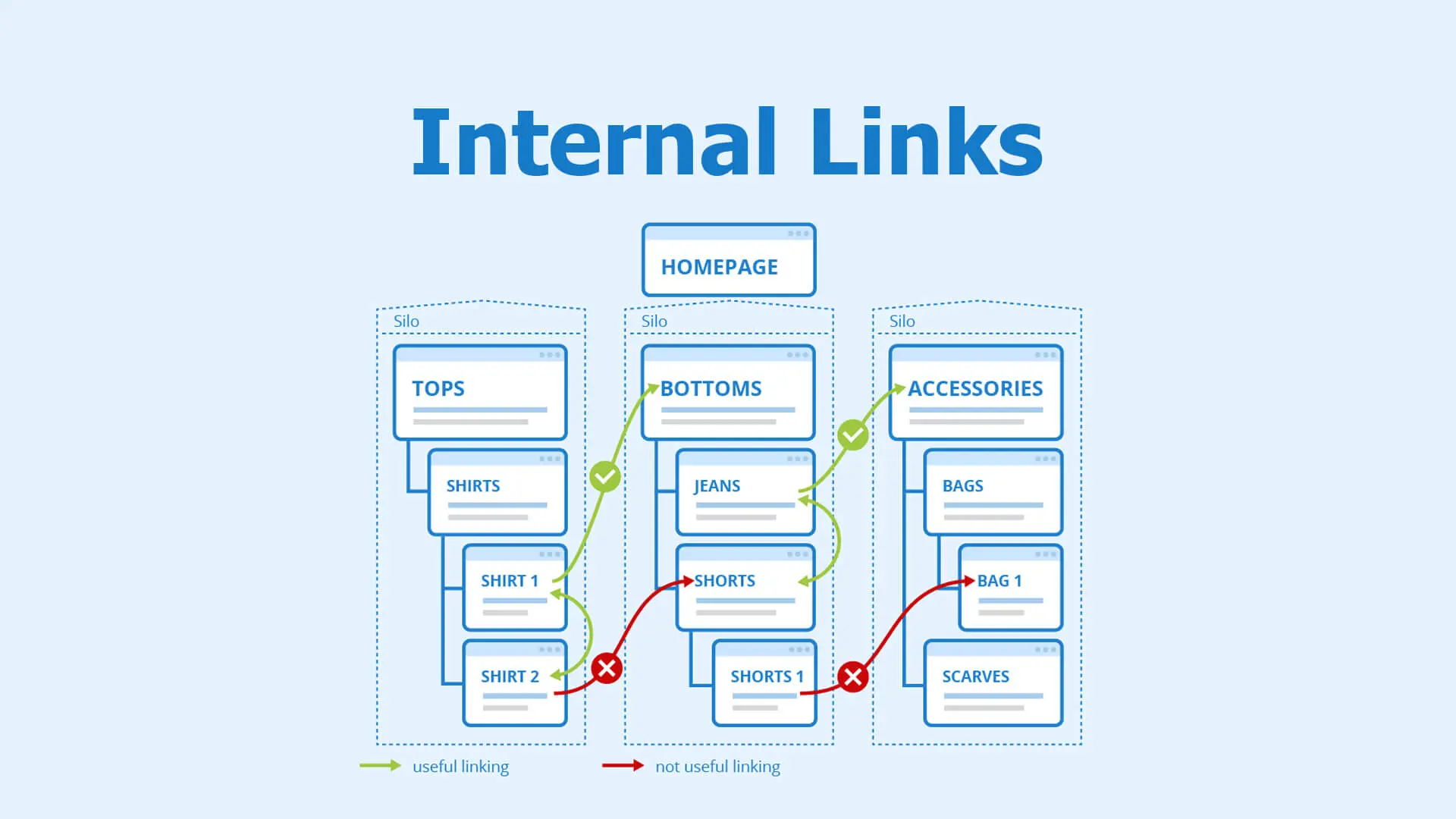
Organize your content into pillar pages and cluster pages:- Pillar Pages: Cover broad topics comprehensively (e.g., “SEO Strategies”).
- Cluster Pages: Cover subtopics in detail (e.g., “Keyword Research,” “Internal Linking Techniques,” “Backlinking Tips”).
- Creates a clear hierarchy for both users and search engines.
- Strengthens topical authority by showing search engines the relationship between pages.
- Map your content visually to see clusters and their pillar page connections.
- Ensure each cluster page links back to its pillar page and vice versa.
- Use descriptive anchor text that includes relevant keywords naturally.
3. Prioritize High-Authority Pages for Linking
Not all pages on your site are created equal—some naturally have higher authority due to backlinks or traffic. Internal linking allows you to pass this “link equity” from authoritative pages to other important pages, helping them rank higher in search results and supporting a balanced SEO structure throughout your website. Leverage pages that already have high authority to boost other pages. How to do it:- Identify pages with high backlinks, traffic, or rankings.
- Link from these pages to new or underperforming pages.
- Your homepage or top-performing blog post can link to a product page, category page, or newer article to pass authority.
4. Use Descriptive, Keyword-Rich Anchor Text
Anchor text tells both users and search engines what the linked page is about. Best Practices:- Use descriptive text, not generic phrases like “click here.”
- Naturally include target keywords relevant to the destination page.
- Avoid keyword stuffing—anchor text should flow with the surrounding content.
- Instead of: “Read more here,”
- Use: “Learn more about internal linking best practices to improve SEO.”
5. Ensure Links Serve a Purpose for Users
Strategically placed internal links guide visitors to related or complementary content, encouraging them to spend more time exploring your site. This not only keeps users engaged but also signals to search engines that your site provides valuable, relevant content, which can positively influence rankings. Internal links should enhance the user journey, not just exist for SEO. How to do it:- Link to content that adds value or context to the current page.
- Think from the reader’s perspective: does this link answer questions or provide more depth?
- On a blog post about “Keyword Research,” link to a page on “SEO Tools for Keyword Analysis.”
6. Avoid Overlinking and Broken Links
Too many links on a single page can overwhelm users and dilute SEO value. How to avoid mistakes:- Limit links to 5–10 per paragraph for content-heavy pages.
- Regularly audit links to remove broken, outdated, or irrelevant links.
- Use tools like Broken Link Checker or Screaming Frog to detect issues.
7. Monitor Performance and Adjust
Internal links help reinforce the context of your pages, associating them with specific topics and keywords. By linking related content together in a logical structure—often through content clusters—you signal to search engines which pages are most relevant for particular search queries, improving your overall topical authority. Internal linking is an ongoing strategy. Track its impact to optimize continuously. Metrics to monitor:- Organic traffic to linked pages.
- Average session duration and dwell time.
- Bounce rate and click-through on internal links.
- Use Google Analytics and Google Search Console to track performance.
- Adjust links based on which pages need more authority or engagement.
8. Leverage Tools and Plugins
Tools can simplify and automate internal linking while ensuring SEO best practices. Recommended Tools:- Yoast SEO: Provides internal linking suggestions while writing content.
- Rank Math: Offers automatic link suggestions and anchor text optimization.
- Internal Link Juicer: Automatically links keywords to relevant pages.
Best Practices for Internal Linking
- Maintain a logical site hierarchy.
- Use descriptive anchor text.
- Limit the number of links per page to avoid dilution.
- Regularly audit for broken or outdated links.
- Include examples and screenshots if possible.
8. Common Mistakes to Avoid
- Overstuffing anchor text with keywords.
- Linking only homepage or top pages.
- Broken or outdated links.
- Ignoring user experience.
How AQ Enhances SEO with Internal Linking
At AQ, we specialize in designing internal linking strategies that not only improve SEO but also enhance the overall user experience. With years of experience in digital marketing and social media strategy, our team ensures that your website’s internal structure is optimized for both search engines and your audience.Conclusion
Internal linking is a cornerstone of effective SEO, enhancing site crawlability, user experience, and content authority. When executed correctly, it distributes link equity, supports topical relevance, and keeps visitors engaged longer. Implement these strategies today, or let AQ guide your website’s internal linking to maximize SEO performance, ensuring your site achieves both higher rankings and better user satisfaction.FAQs About Internal Linking
- What is the ideal number of internal links per page? While there’s no strict limit, aim for a natural number that enhances navigation without overwhelming users or diluting link equity. Focus on linking to relevant, high-value pages.
- How often should internal links be updated? Internal links should be reviewed regularly—ideally every 3–6 months—to remove broken links, update anchor text, and adjust links based on changing content priorities.
- Can internal linking hurt SEO? Yes, if overdone or done incorrectly. Excessive keyword-stuffed anchor text, linking irrelevant pages, or maintaining broken links can negatively impact SEO. Proper strategy is key.
- Which plugins are best for internal linking? For WordPress users, popular options include Yoast SEO, Rank Math, and Internal Link Juicer. These tools help automate internal linking while keeping it SEO-friendly.
- How does internal linking support content clusters and topical authority? By linking related pages together around pillar content, internal linking signals to search engines the hierarchy and relevance of your content. This strengthens topical authority, improving rankings for related search queries.

Recent Posts
abdelrahman.qazaer@gmail.com/0 Comments
Keyword Stuffing: The Ultimate Guide for Safe and Effective SEO in UAE and Jordan

abdelrahman.qazaer@gmail.com/0 Comments
Short-Form Social Posts: Comprehensive Guide for UAE & Jordan Businesses

abdelrahman.qazaer@gmail.com/0 Comments